

By Ashlie Camp
It is infuriating when you can’t find the tool you need and finding the right ones shouldn’t make your life MORE difficult. That’s why we’ve created and transformed the DTS tool catalogue from an overwhelming SharePoint page into a user-friendly Power App and it’s now available for anyone to use (or reuse!).
Why we built it
The original DTS catalogue began life as a well-meaning brain dump, a collection of useful apps, platforms, and resources submitted by teams across Birmingham City Council. But while the content was gold, the format wasn’t.
A single SharePoint page was hiding layers of great tools that most people never even knew were there. It was too much text, too many links, and too hard to navigate.
So we decided to fix it and in the process, created something reusable that could help across the whole council.
What the app does
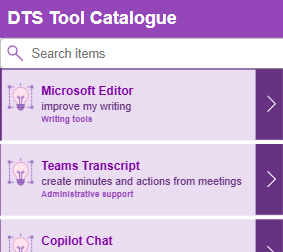
The new Power App version of the catalogue makes exploring tools intuitive, searchable, and much more engaging.
Key features:
- Smart search – Looking for a tool to help with “design” or “reporting”? Just type in a keyword and the app brings up everything relevant.
- Snapshots at a glance – Each tool has a quick summary of what it does, how it can help, and how to access it.
- Direct support links – If a tool needs a license or has support documentation, you’ll find it right there, no need to search elsewhere.
- Access request buttons – If you need a tool, just click through to the correct avenue to request it or have a conversation about it.
We’ve also built in category icons (with more coming soon!) and the ability to keep information updated in real time direct from the easy to use SharePoint list.
Built with curiosity (and CoPilot)
We used Microsoft Copilot to guide the process. From mock-ups to prompts, to debugging and redesigning the front end, this app was a learning journey powered by experimentation and a lot of resilience. We used Copilot to the point of exhaustion and created the app by pressing every wrong button until we found the right ones.
By asking Copilot to mock up a visual design first, we were able to show stakeholders what the app could look like before building it, ensuring the vision was right before we dedicated time and resource to it.
It’s now a template
We’ve now set up the app as a template, so if you have a large bank of information that people need to search through; like a template library, software database, or resource list, this tool could work for you too.
Why it matters
This app is more than a tech upgrade, it’s part of a wider shift towards:
- Reducing non-standard app requests (e.g. asking for tools we already have)
- Making better use of our existing Microsoft licensing
- Encouraging teams to explore what’s available before going external
- Supporting the rebuild of the DTS Guidebook, which will now feature catalogues of tools, templates, and resources, all built using this same model
It’s also helping shape a new internal comms initiative: Tool School a weekly spotlight on tools we already have that could make your work easier.
Next steps: User testing, feedback, and rollout
The app is live, functional, and already making an impact but there’s more to come.
We’ll be working with the UX and UR teams to run user research, check accessibility, and refine based on feedback. We’re also exploring how to:
- Tag tools based on licensing (e.g. free vs. restricted)
- Highlight the quickest routes to access
- Show how tools connect to one another across tasks
- Work out any bugs
- Set up governance